Sub-Collections for Smarter Organization
🆕 New
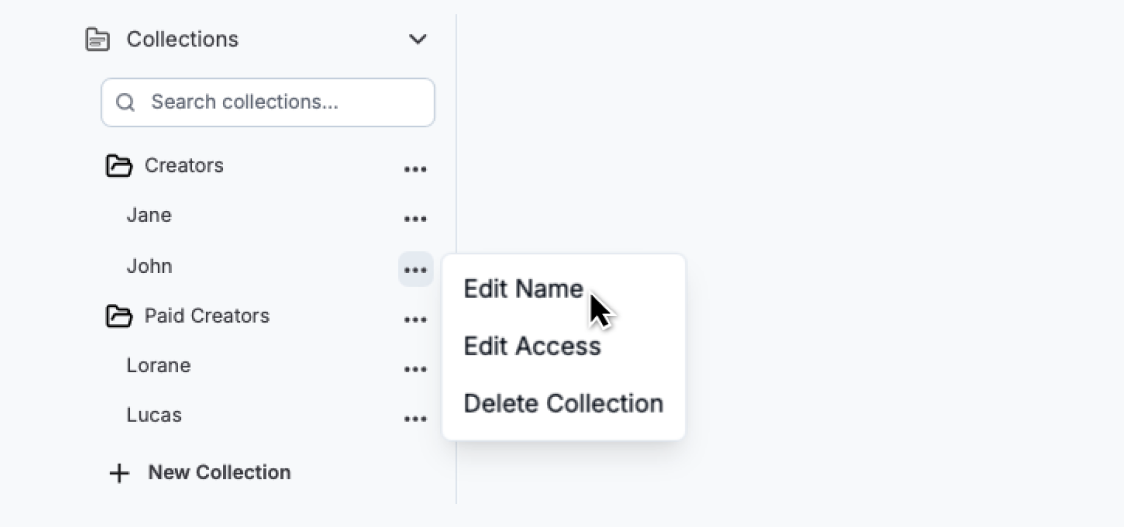
Sub-Collections: You can now create sub-collections within your main collections to better organize accounts and videos.
Slash-Based Naming: Use forward slashes “/” to create sub-collections automatically.
Example: Naming a collection “Creators/John” creates a main collection named “Creators” with a sub-collection “John” inside it.
Naming another collection “Creators/Jane” adds a second sub-collection named “Jane” under the same main collection “Creators”.
Move Sub-Collections by Renaming: Easily reorganize your collections by renaming them.
Example: if you want to move the sub-collection “John” from the “Creators” collection to a new collection called “Paid Creators,” just rename “Creators/John” to “Paid Creators/John” — and it’ll be moved instantly.
🔀 Pro-tip
Organize Existing Collections by Renaming: If you’ve been using a custom naming conventions (e.g. “Creators | John”) to organize collections, you can now switch to the new slash-based format (”e.g. Creators/John”). Just rename your collections, and they’ll automatically be grouped into sub-collections in the sidebar.