New Features

Follow new updates and improvements to Shortimize.

March 27th, 2026

Automated creator payments now support multiple currencies, including USD, EUR, GBP, Rupee, Pesos, Real, and many more. Pay creators accurately in their local currency, no manual conversions, no rounding guesswork.

This expands a payments system already built for scale: automatic payouts to contractors across 180+ countries, with flexible options including bank transfer, PayPal, and crypto. Multi-currency support is the latest step in keeping payments fully configurable and truly international, wherever your creators are.

More improvements are on the way.

Have a request or something you'd like to see? We read everything, reach us at support@shortimize.com.
March 24th, 2026

Previously restricted to Scale and Enterprise plans, the Premium API add-on ($150/mo) is now open to all paid plans. Get access to all your data, higher rate limits (30–120 req/min), and webhook support for production-ready usage.

Explore the API for Free
Basic API access is included with all paid plans at no extra cost. Hit any endpoint and see exactly how the data is shaped so you can build and test your integration before committing to more.

Connect Your AI Agents with MCP Server Integration
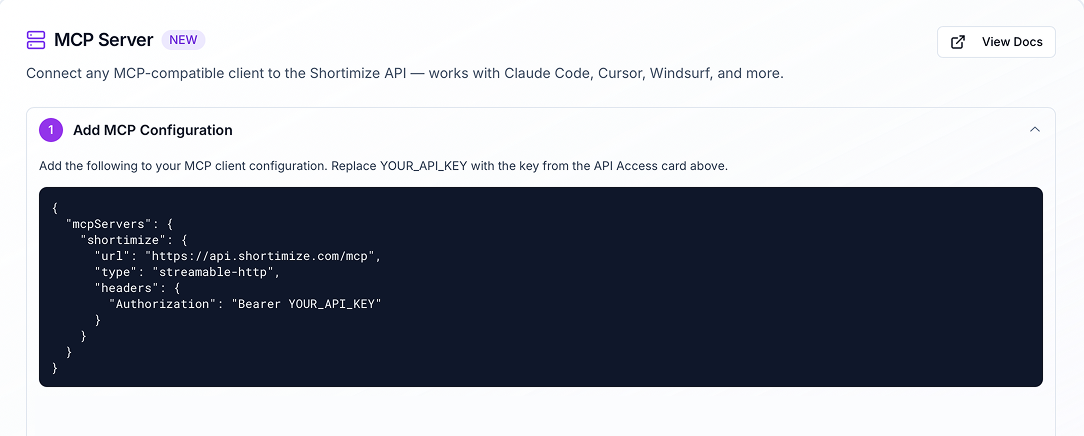
Shortimize can now be plugged directly into your AI coding tools (Claude Code, Cursor, Windsurf, and more) as an MCP server. Use your existing API key to connect and unlock powerful customizability, letting your agents work with Shortimize data natively inside your workflows.

Go to Settings > API & Automation to explore API Access.

March 16th, 2026

We’ve officially re-added support for our updated MCP server, making it easier to connect Shortimize data into your workflows and tools.

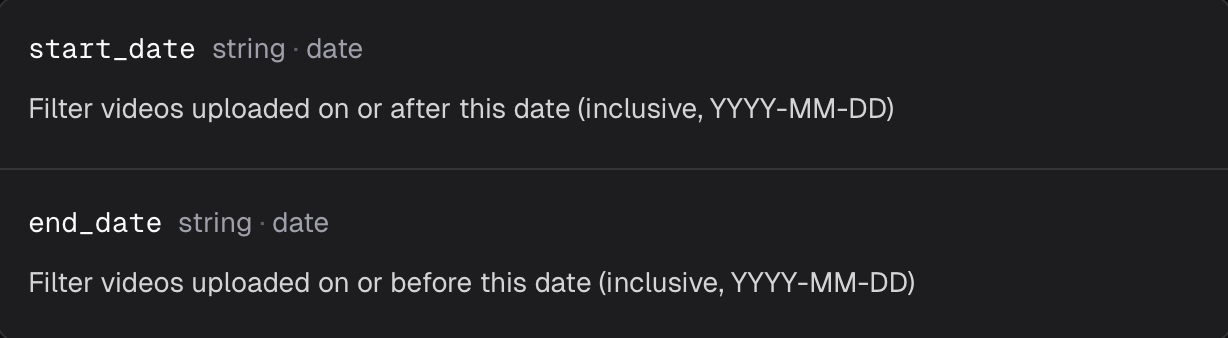
Alongside this, we’ve also introduced new date filtering on the accounts/{account_id}/videos endpoint. You can now use optional start_date and end_date query parameters to return only videos uploaded within a specific time range.

Example:

/accounts/{account_id}/videos?start_date=2026-03-01&end_date=2026-03-15

We’ve also improved result ordering. Video results are now returned chronologically by upload date, replacing the previous random sorting.

Why this matters

You can now pull only the data you actually need, instead of fetching all videos and filtering them on your side. This makes the API more efficient, reduces unnecessary processing, and makes it much easier to build cleaner reporting, syncs, and data pipelines.

This update is now live.
Check the API page to enable API access and review our extensive documentation.

February 9th, 2026

We're thrilled to launch our Superwall integration, now available to try directly in Shortimize.

This is especially exciting for app founders and product teams as you can now:

  • Track your in-app revenue alongside views and engagement

  • See which videos actually convert and drive real revenue

  • Differentiate between videos that just gain views and those that deliver results

Your revenue metrics will appear in the Overview Graph, giving you a unified view of performance and monetization.

Click the “Revenue” card at the top of the graph in the overview
or go to Settings > Integrations > Superwall to set up your Superwall integration

February 6th, 2026

You can now assign specific hashtags to a collection. When you do this, the collection will automatically only show videos (from the accounts you're tracking) that include those hashtags in their captions.

This works as a smart filter, keeping your collection focused on exactly the content you want to see.

  • What This Means for You

    • Automated Campaign Tracking: Effortlessly monitor influencer or brand campaigns. Set your campaign hashtag and the tracked accounts, and the collection will automatically populate with only the relevant posts, saving you from manual searching and filtering.

    • Get Cleaner, More Relevant Data: By filtering out the noise, your collections will only contain the videos you care about, giving you a crystal-clear view of performance.

    • Save Time: Eliminate manual work and let the platform automatically categorize and track the right content for you.

This feature is now live for all collections. Create a collection with a Hashtag Match Filter today to streamline your workflow and get to insights faster.

January 9th, 2026

We’re rolling out a powerful new way to analyze your data: sorting metrics within a specific date range. While you've always been able to sort columns for all-time performance, you can now isolate a timeframe to find top performers from last week, last month, or any custom period.

What This Means for You

  • Find recent winners: Instantly identify your top-performing content from a specific period.

  • Analyze campaigns with precision: Isolate performance data within launch dates to accurately measure impact.

How It Works

  1. Apply a Date Range: In the Accounts or Videos table, click "Select date range," choose your period, and click "Apply."

  2. Sort by Any Column: This will trigger the new sorting feature, which will load and sort data only from within the date range.

  3. When Selecting a New Date Range: the data will refresh and sort for the new period.

This feature is now live for all users. Head to your tables to analyze your data with more precision than ever before!

January 8th, 2026

We've added a powerful new option to help you manage your tracked items more efficiently. When deleting a collection, you can now simultaneously untrack all the videos it contains.

  • What This Means for You

    • Efficient Cleanup: Think of it as deleting a folder and its contents in one go. You can now remove a collection and stop tracking everything inside it with a single action.

    • Save Time: No more manually untracking videos one by one after you've deleted their collection.

    • Bulk Management: This makes it easy to stop tracking entire groups of videos or accounts that are no longer relevant to your work.

    How It Works

    1. When deleting a collection, expand the "Advanced" options.

    2. Check the box to also untrack the videos inside.

    3. Confirm the deletion.

January 1st, 2026

What you can now do via API:

  • Create, update, or move collections

  • Set or change:

    • name

    • parent_id (to nest sub-collections)

    • access type: private, protected, or public

    • password (for protected collections)

    • display_settings (controls visibility of metrics/columns for public views)

Authorization

All requests require a valid Authorization header.

Use Cases:

  • Automate collection creation when onboarding clients

  • Programmatically update sharing settings

  • Organize collections at scale without using the UI

Enable API access via the settings page.

Read Shortimize API Documentation here

December 29th, 2025

We’ve made it easier and more flexible to control how your collections are shared externally.

What’s New:

  • When sharing a collection publicly, you can now choose exactly which columns and data are visible

  • Toggle between a minimal layout (bare essentials only) or full visibility (all table metrics shown)

  • The sharing flow is now simpler and more intuitive when choosing between:

    • Private

    • Password-protected

    • Public

Why it matters:

This gives you granular control over what you show when sharing performance data with clients, teammates, or partners—whether you’re showing everything or just the highlights.

More transparency when you want it, more privacy when you need it.

December 11th, 2025

We’ve improved how and where you control which video metrics are shown based on upload date and extended this functionality to the Accounts Table as well.

What’s New:

  • The “Only show metrics from videos uploaded in date range” toggle is now also available in the Accounts Table

    → This lets you filter account-level metrics based solely on videos posted during your selected time range

    → Perfect for analyzing growth, engagement, and output during a specific campaign or period

Improved Placement in UI:

  • We’ve relocated the toggle to a more intuitive spot

    → It now appears inside the date range filter when selecting a custom range in Overview, Tables, and now also in the Accounts Table

By bringing this control front and center, it’s easier than ever to zoom in on the exact performance window you care about without digging through settings.