
New Features

Follow new updates and improvements to Shortimize.

Multi-currency support now live in creator payments

Automated creator payments now support multiple currencies, including USD, EUR, GBP, Rupee, Pesos, Real, and many more. Pay creators accurately in their local currency, no manual conversions, no rounding guesswork.

This expands a payments system already built for scale: automatic payouts to contractors across 180+ countries, with flexible options including bank transfer, PayPal, and crypto. Multi-currency support is the latest step in keeping payments fully configurable and truly international, wherever your creators are.

More improvements are on the way.

Have a request or something you'd like to see? We read everything, reach us at support@shortimize.com.
MCP and API Add-on Now Available on All Plans

Previously restricted to Scale and Enterprise plans, the Premium API add-on ($150/mo) is now open to all paid plans. Get access to all your data, higher rate limits (30–120 req/min), and webhook support for production-ready usage.

Explore the API for Free
Basic API access is included with all paid plans at no extra cost. Hit any endpoint and see exactly how the data is shaped so you can build and test your integration before committing to more.

Connect Your AI Agents with MCP Server Integration
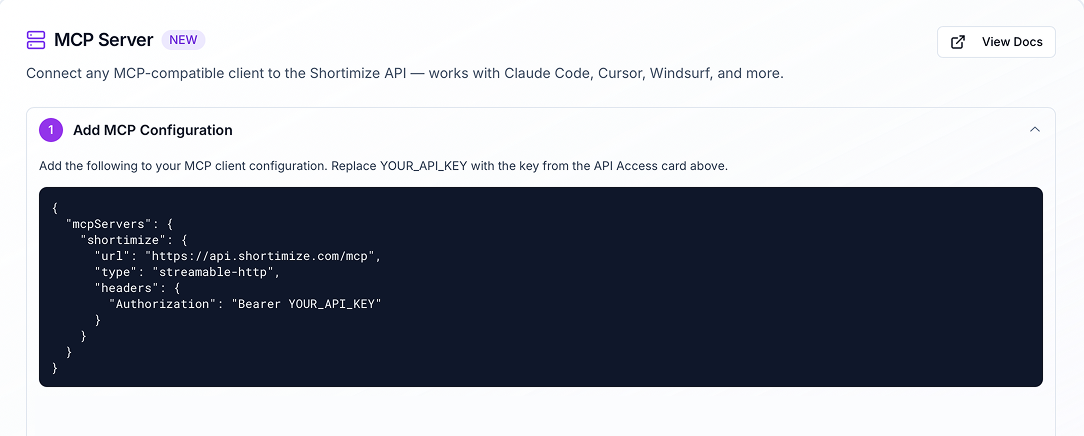
Shortimize can now be plugged directly into your AI coding tools (Claude Code, Cursor, Windsurf, and more) as an MCP server. Use your existing API key to connect and unlock powerful customizability, letting your agents work with Shortimize data natively inside your workflows.

Go to Settings > API & Automation to explore API Access.

API Update: MCP Server Is Now Live + New Video Date Filtering

We’ve officially re-added support for our updated MCP server, making it easier to connect Shortimize data into your workflows and tools.

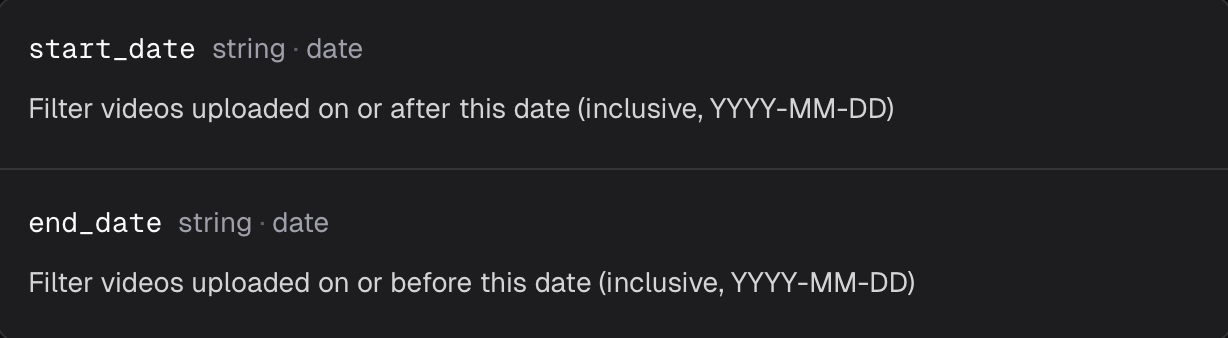
Alongside this, we’ve also introduced new date filtering on the accounts/{account_id}/videos endpoint. You can now use optional start_date and end_date query parameters to return only videos uploaded within a specific time range.

Example:

/accounts/{account_id}/videos?start_date=2026-03-01&end_date=2026-03-15

We’ve also improved result ordering. Video results are now returned chronologically by upload date, replacing the previous random sorting.

Why this matters

You can now pull only the data you actually need, instead of fetching all videos and filtering them on your side. This makes the API more efficient, reduces unnecessary processing, and makes it much easier to build cleaner reporting, syncs, and data pipelines.

This update is now live.
Check the API page to enable API access and review our extensive documentation.

Earlier updates